
Before you start
- To verify a policy you already hold, have its policy number and a copy of the policy document as a PDF, JPG or PNG under 10 MB.
- To buy a new policy, have your practice details ready for Marsh Commercial’s application form.
Steps
- In the sidebar, open Finances and select Insurance.
Buy new cover from Oxygen 2. On the banner, select Buy Now. The Continue to Marsh window explains the two steps. 3. Select Continue to Marsh. Marsh Commercial’s site opens in a new tab. 4. Complete your purchase there, and choose MWO from the Bodies list so the policy is linked to MyWellOps. 5. When your policy documents arrive, come back and verify the policy (below).
Verify a policy you already have
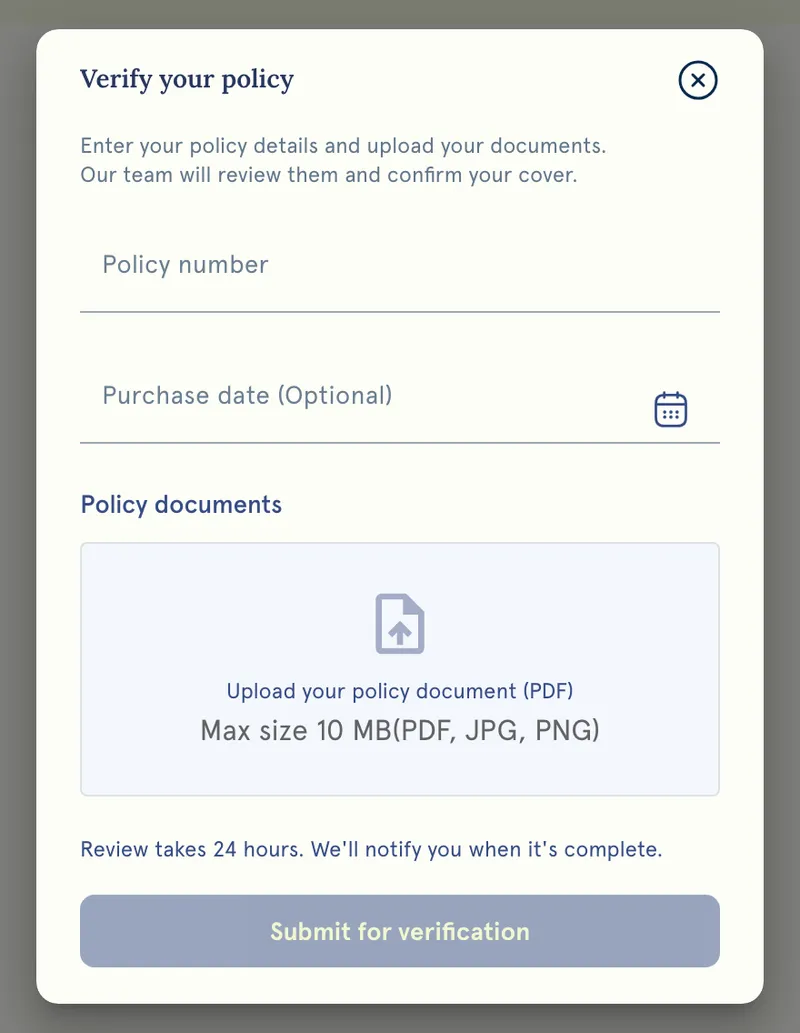
- Under Already have insurance?, select Verify policy.
- Enter your Policy number. Purchase date (Optional) can be left blank.
- Under Policy documents, upload your policy document.
- Select Submit for verification.
What happens next
- You’ll see Submitted for Verification Successfully!, and the Insurance page shows Verification under Progress until the MyWellOps team has reviewed it.
- Once it’s verified, Verify policy becomes Manage Insurance Policy, where you can see the file and when you uploaded it.
- Insurance Verified then appears on your booking profile. To hide it, turn off Show Insurance Verified in Manage Insurance Policy.
- If the team can’t verify it, the form opens with “Your previous submission was rejected. Please resubmit.” Upload a clearer or up-to-date document.
Good to know
- The Premium plan note in the app says your discount is applied once your policy is uploaded and verified.
- Your uploaded certificate counts towards your document storage. Uploading a new one replaces the old one rather than adding to it.
- When you renew your policy, upload the new document so your profile reflects current cover.
- My Well Ops Ltd is an Introducer Appointed Representative of Marsh Ltd. Marsh Ltd is authorised and regulated by the Financial Conduct Authority (FCA) for General Insurance Distribution and Credit Broking (Firm Reference Number 307511). Registered in England and Wales, Number: 1507274. Registered office: 1 Tower Place West, Tower Place, London EC3R 5BU.
Troubleshooting
My file won’t upload. It must be a PDF, JPG or PNG under 10 MB. A photo of the document from your phone usually works if a scan is too large.
Submit for verification does nothing. A policy number and a file are both needed.
Marsh’s site didn’t open. It opens in a new tab. If nothing happens, allow pop-ups for MyWellOps in your browser and try again.
How do I know it’s been verified? Check Finances → Insurance. When Manage Insurance Policy shows Verified, you’re done.