
Before you start
- Add the client first. If you have no clients, the app shows Add client.
- To let clients pay by card, connect Stripe first.
- Set your Payment Terms, Accepted Payment Methods and VAT in the Billing Settings tab.
Steps
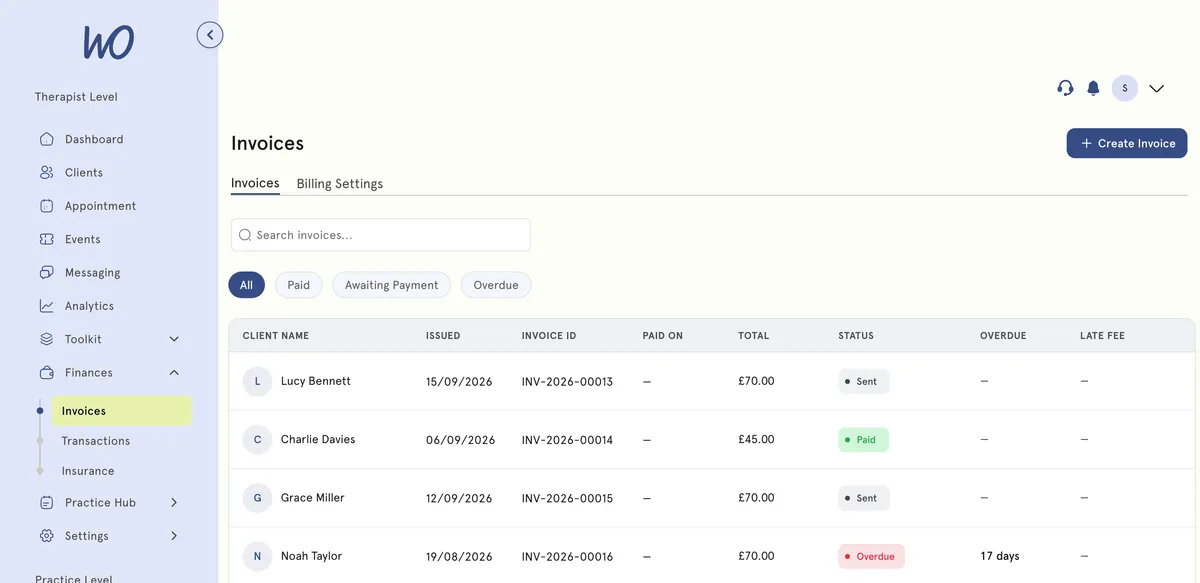
- In the sidebar, select Finances, then Invoices.
- Select Create Invoice.
- New invoice opens. Under Client, choose the client from Select a client, then select Continue.
- Select Add line. Choose Add line item to enter a service name, quantity and unit price. Or choose Select existing service to pick one of your services.
- To change the dates, add a note, or add taxes and discounts, use More.
- Select Save and generate to issue and send the invoice. Or select Save as draft to finish it later.
What happens next
When you issue an invoice, your client gets it by email. If Stripe is ready to take payments, they can pay by card online.
The invoice appears under Awaiting Payment. If it isn’t paid by its due date, it becomes Overdue, and your client gets one automatic overdue email.
Invoices from bookings
When you book a client into a paid service yourself, an invoice is created and issued for you. If you turn off Send confirmation email when booking, the invoice is still created but not emailed.
Good to know
Open the menu on an invoice in the list to use these options:
- Resend Invoice emails it to your client again. There is no separate reminder button, so use this to chase payment.
- Copy Payment Link copies a link to the invoice so you can share it yourself.
- Mark as Paid records a payment you took outside the app: Cash, Check, Bank Transfer or Card.
- Delete voids an issued invoice.
Also:
- A platform fee applies to online card payments.
- If the invoice looks like one your client already has open, you’ll see Similar invoice detected first.
Troubleshooting
The client didn’t get their invoice. Check the email address on their profile, then use Resend Invoice from the invoice’s menu. Ask them to check spam or junk.
Can I change an invoice after issuing it? No. Only drafts can be edited (Edit invoice). Issued invoices can only be viewed. If one is wrong, Delete it, which marks it void, and create a corrected one.
It says Overdue but the client paid me in cash. Use Mark as Paid and choose Cash. The status updates straight away.