
Before you start
- If you don’t have a saved card, have one ready. You may be asked for it when you upgrade.
Steps
- In the sidebar, select Settings, then Subscription. The Subscription page opens in its own tab. The top shows your current plan and price, when it next bills, and the card it bills to, with Billing history alongside.
- Under Find the right plan for your practice, choose Monthly or Annual · save 20%. You can also switch the currency shown.
- On the plan you want, select its button:
- Upgrade to [plan]: a bar shows the amount Due today (prorated). Select Confirm upgrade.
- Downgrade: in the Downgrade plan window, select CONFIRM DOWNGRADE. To stop, select Keep Subscription.
- If you’re asked for card details, enter them to finish.
- When you see Upgrade Successful!, select CLOSE.
Add an add-on
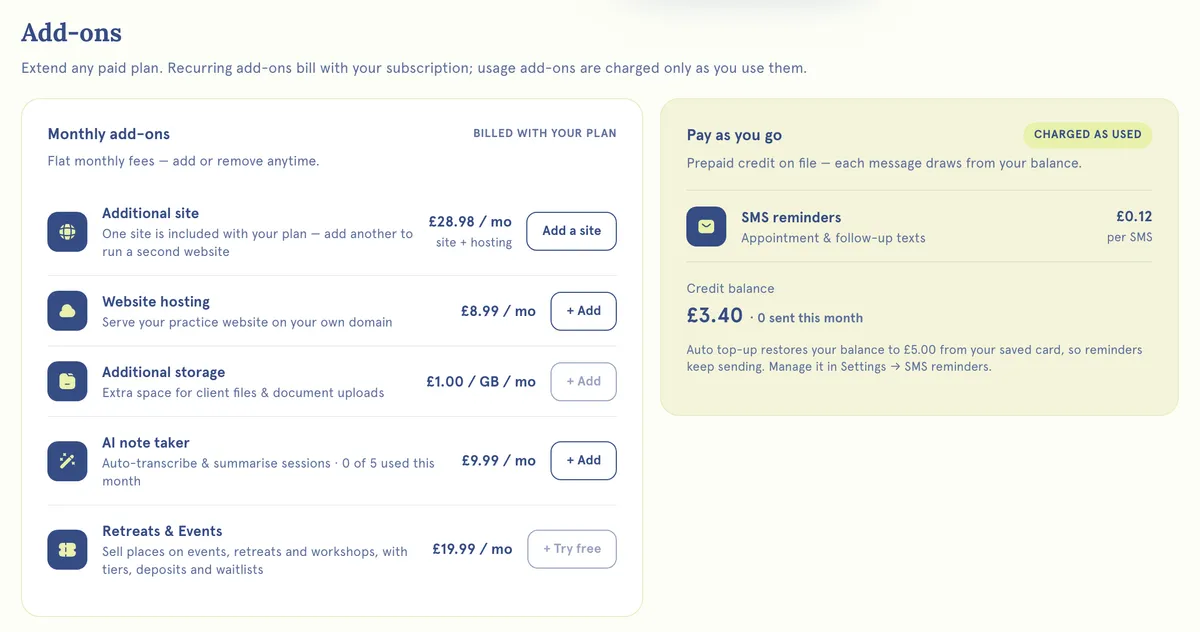
- Scroll down to Add-ons.
- Under Monthly add-ons you’ll find Additional site, Website hosting, Additional storage, AI note taker and Retreats & Events, each with its monthly price. Ones you already have show Added, with Remove beside them; Additional site has Manage. Under Pay as you go, SMS reminders is charged per message as you use it.
- For storage, choose from 1 to 20 GB and select Confirm. For hosting and the AI note taker, you go to a secure payment page.
- For Additional site, select Add a site. This opens your website list.
What happens next
When you upgrade, you pay a prorated amount for the rest of your billing cycle. When you downgrade, you get credit for unused time on your old plan. Add-ons you buy show Added.
Good to know
- Additional storage is only available on paid plans.
- To remove an add-on, select Remove, then Remove add-on. Add-ons need 30 days’ notice. They stay active until the date shown.
- Removing storage doesn’t delete your files. Removing the AI note taker keeps the notes you already have.
- Add-on prices are set in pounds (GBP). If an add-on isn’t available for your account or currency, the app tells you.
- On a free trial, you can convert to paid early with Confirm & upgrade to [plan]. You’re charged the full price that day.
Troubleshooting
My payment failed when I tried to upgrade. Check the card has funds and allows online payments, including international ones. If it still fails, try another card or ask your bank.
How do I close my account? There’s no option in the app to delete your account. To stop paying, cancel your plan from Settings → Subscription. To close the account itself, contact us.