
Steps
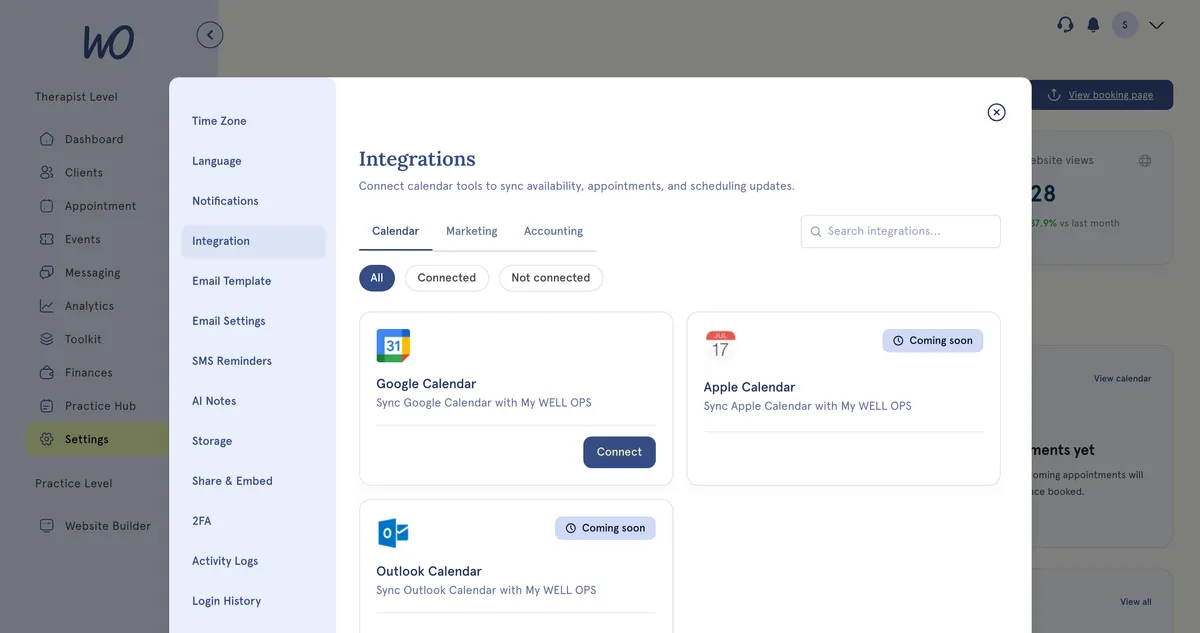
- In the sidebar, select Settings.
- Select Integration. It opens on the Calendar tab.
- Switch between Calendar, Marketing and Accounting to see each group.
- To find one quickly, type in Search integrations…, or choose Connected or Not connected. Both work within the tab you’re on.
- Select Connect on a card to set it up, or Manage on one you’ve already connected.
Available now
- Google Calendar (Calendar tab) — your Google events show in MyWellOps, and your appointments appear in Google as busy time. See Connect your Google Calendar.
- Stripe (Accounting tab) — let clients pay online by card. See Connect Stripe so clients can pay online.
Coming soon
These cards are marked Coming soon and have no button yet:
- Calendar: Apple Calendar, Outlook Calendar
- Marketing: Google Tag Manager, Google Analytics, Facebook Pixel, Google Ads, WhatsApp, SMS, Mailchimp
- Accounting: Xero, SumUp
Good to know
- Text reminders already work without the SMS card. Set them up in Settings → SMS Reminders — see Set up SMS reminders.
- Disconnecting an integration only removes its link to MyWellOps. Your Google or Stripe account stays as it is.
Troubleshooting
A card has no Connect button. It’s coming soon and can’t be set up yet.
I can’t find an integration. Search only covers the tab you’re on. Try the other tabs, and set the filter back to All.