
Before you start
- Blogging is part of the Growth plan and above. On the free plan, opening the blog shows Blogging is a Growth feature. with Upgrade to start blogging.
- Posts only reach visitors once your website is published. See Build and publish your practice website.
Steps
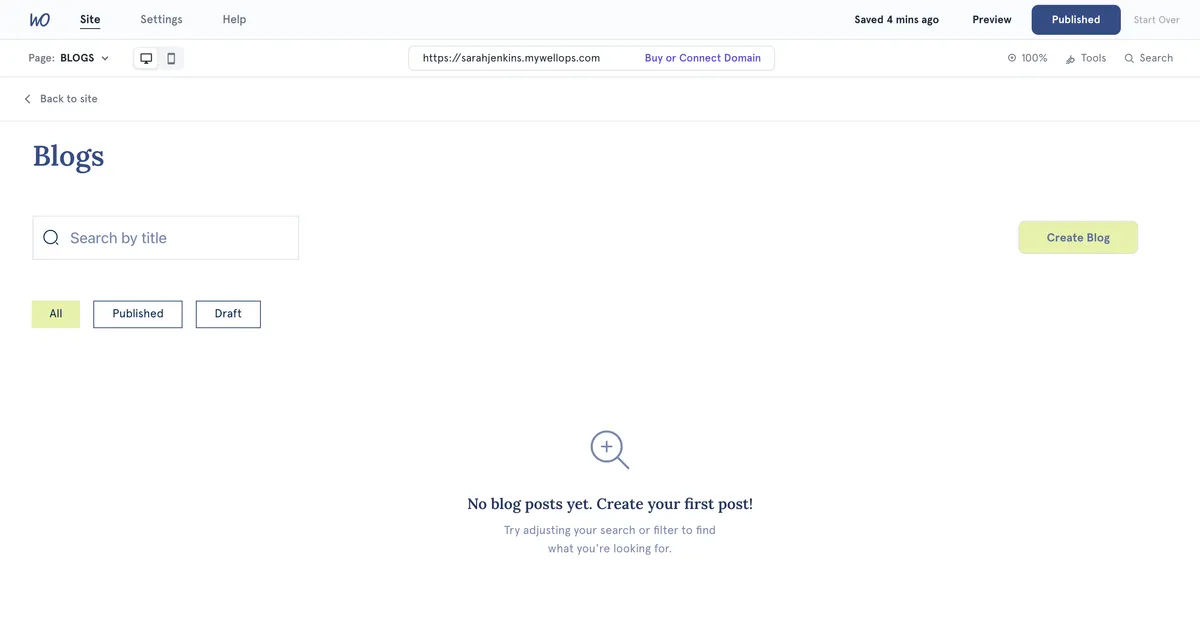
- Open Website Builder and select Pages in the left bar.
- Select Blogs. The blog manager opens, with a list of your posts.
- Select Create Blog.
- Enter a title under Enter your blog title. It needs at least 3 characters.
- Under Blog Cover Image, select the empty box and upload an image. Once it’s in, add a short description under Alt text for cover image.
- Select ADD A SECTION and choose what to add: Heading, Content, Content and content, Image, Image and content or Video. Fill each section in on the right. Add as many as you need.
- Select Save as Draft to keep working on it later, or Publish to put it on your website.
Edit a post In the post list, select the post’s title, or use the Action menu and choose Edit Post. After editing a live post, select Publish again to update it.
Delete a post Use the Action menu and choose Delete Post, then DELETE. This can’t be undone.
Go back to your site Select Back to site at the top of the post list.
What happens next
- A published post appears on your website’s Blog page, with its cover image and title. Visitors select it to read the whole post.
- On paid plans, a Blog link appears in your website’s navigation.
- Once a post is published, a Preview button in the editor opens it on your live website.
Good to know
- Use the filter above the list to show All, Published or Draft posts.
- For a video, choose Embed Code and paste the embed code from YouTube or Vimeo, or choose Upload Video to upload a file.
- Undo and redo buttons sit above the post preview.
Troubleshooting
My post disappeared from the website after I saved it. Save as Draft turns a published post back into a draft, which takes it off your website. Open the post and select Publish again.
Preview isn’t there. It only appears for published posts. If you see Website not published yet, publish your website first.
I can’t select Publish. Check the title. It must be at least 3 characters.